Albania
 Argentina
 Australia
 Austria
 Belgium
 Bosnia and Herzegovina
 Brazil
 Bulgaria
 Canada
 Chile
Chile
 Colombia
 Croatia
 Czech Republic
 Denmark
 Estonia
 Finland
 France
 Germany
 Greece
 Hungary
 Ireland
 Italy
Italy
 Latvia
 Lithuania
 Luxembourg
 Mexico
 Moldova
 Montenegro
 Netherlands
 New Zealand
 North Macedonia
 Norway
 Philippines
 Poland
 Portugal
 Romania
 Serbia
 Slovakia
 Slovenia
 South Africa
 Spain
Spain
 Sweden
 Switzerland
 Turkey
 Ukraine
 United Kingdom
 United States of America



Studio
For every producer, musician or sound engineer, a studio is where ideas become recordings. Build the equipment around what you want to do: capture a voice or instrument, create music on a computer, check a mix or improve how the room sounds. Start with a working signal path and add other components to solve specific problems. This way, you can put together a home studio or expand a professional room without buying equipment that does not work well together.
What you need for different ways of working
A singer, guitarist or songwriter will usually need a suitable microphone, audio interface, headphones and a stand. An electronic music producer can begin with a computer, studio software and a MIDI keyboard or controller, adding a microphone only when vocals or acoustic instruments need to be recorded. Reliable monitoring in familiar acoustic conditions matters when mixing. At rehearsals, concerts or in the field, a standalone recorder may be more practical than a computer.
| Type of work | Essentials | Add when needed |
|---|---|---|
| Recording vocals or instruments at home | Audio interface, microphone, headphones | Stand, pop filter, acoustic treatment |
| Electronic music and beats | Computer, studio software, MIDI control | Monitors, headphones, DAW controller |
| Mixing and editing recordings | Monitors or open-back headphones | Acoustic treatment, monitor stands and isolation pads |
| Mobile or field recording | Digital recorder or portable audio interface | External microphone, wind protection, portable accessories |
The signal path from source to recording
Begin with a dependable centre for your system. Audio interfaces connect microphones and instruments to a computer; compare the number of inputs and outputs you will use at once, the connection type and monitoring options. Two inputs may be enough for voice and guitar, while recording several musicians simultaneously requires more channels. Do not buy spare capacity automatically—only do so when you know which sources you will connect at the same time.
Choose among studio microphones according to the source, room and intended use. A condenser microphone tends to capture fine detail as well as the sound of the room, while a dynamic model can be more practical for a louder source or a less controlled space. The signal path also includes stands, cables, pop filters and other studio accessories; one missing small component can stop an entire recording session.
Monitoring: monitors or headphones?
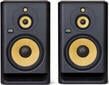
Studio monitors are designed for accurate, balanced listening. Match their size and placement to the listening distance and dimensions of the room, not only to the volume you want. A small workspace often does not need large speakers with extended bass; correct listening position and symmetrical placement of the left and right monitor can make a greater difference.
When recording with a microphone, working late or lacking a suitable room for loud playback, studio headphones are useful. A closed-back design limits spill into the microphone; an open-back pair often sounds more natural for extended critical listening but allows sound to escape. Headphones and monitors therefore complement rather than replace each other. Check a mix on several playback systems you know well.
Acoustic treatment is not soundproofing
Studio acoustic treatment helps control reflections and reverberation inside a room. Absorption panels, bass traps and diffusers can improve recording clarity and make monitoring easier to judge when selected and positioned for an identified problem. They do not, however, soundproof the room.
Soundproofing deals with sound passing through walls, ceilings, floors, doors and other building structures. It requires airtight construction, suitable layers and often building work; thin foam panels cannot replace it. If reflections or unreliable monitoring are the problem, you need to address room acoustics. If sound escapes to neighbours or outside noise reaches the microphone, the issue is isolation, and the room construction should be assessed before acoustic products are purchased.
Recording, creating and controlling a project
If you make electronic music or use virtual instruments, studio software provides the foundation. A MIDI keyboard or controller speeds up note entry and automation without carrying an audio signal. For frequent work with levels, panning and transport controls, DAW controllers give selected software functions physical controls.
For recording without a computer or away from a permanent workspace, explore digital recorders. A handheld model suits rehearsals, interviews and audio notes, while a multitrack recorder captures several sources separately. Before choosing, check the number of tracks, available inputs, power options and recording format against where and how you will use the device.
A workspace that can grow
Every project needs a stable, organised base. Studio furniture helps position monitors, a computer, keyboard and rack equipment so controls remain within reach and cables stay out of the way. Measure the room, your reach and the listening height before buying a desk or stands. Then expand the system in response to what your work actually lacks—another input, quieter monitoring, better reflection control or faster project control.
Equip a studio that can grow with your recordings. A well-chosen foundation does not need to contain everything at once; its components need to form a clear path from the sound source through recording to reliable monitoring.

Studio for beginners

Latest Products: Studio
Deals Studio
Studio Software
Audio Interfaces
Studio Microphones
Studio Acoustic Elements
Studio Monitors

Studio Monitors Stands

Studio Headphones

Digital Recorders
MIDI Controllers
MIDI Master Keyboards
DAW Controllers
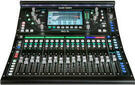
Mixing Desks
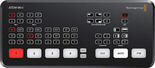
Video/AV Mixers
Studio Accessories
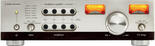
Headphone Amplifiers
Microphone Preamps

Rack Cases and Stands
Studio Furniture

PC Holders and Stands
Digital audio converters
FX and Signal Processors
Multicore Cables
MIDI Cables
Power Cords and Extension Cords
Cables, Plugs and Adapter Plugs

Stands
Tuners and Metronomes
Storage media

YouTube & Podcast & Stream

In-Ear Monitoring
Popular Brands